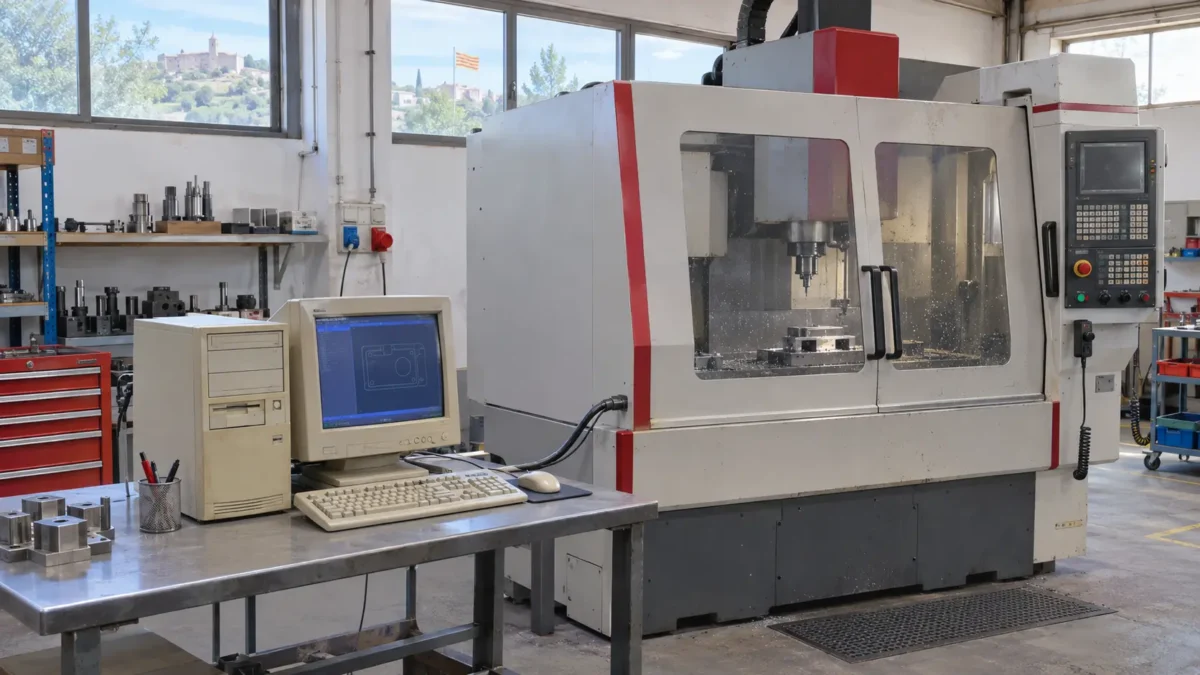
In a machining workshop, a CNC machine is still producing parts to the same tolerances as ever. To load the programme for the next job, the operator uses an old PC. The manufacturer no longer supports that version of the software, and the new PC cannot take the interface card that lets it communicate with the machine.
The CNC machine still has years of useful life ahead of it. But if the PC fails midway through a shift, the workshop might finish the current job and then find itself unable to load the next one. A computer failure could disrupt the production schedule and, depending on the workshop’s workload, delay deliveries.
While the PC is still working, there is time to answer a practical question. If it fails tomorrow, what equipment could we use to resume production, and how long would it take?
Why a new PC can be incompatible with a machine that still works
Replacing an office computer usually means setting up the new workstation and transferring applications and data. With industrial machinery, the replacement has to reproduce a combination of software, hardware and communications that may be specific to that installation.
- Software and drivers. The application may require a particular operating system version or a driver that the manufacturer no longer maintains.
- Connection to the machine. Communication may rely on a serial port, a proprietary interface card or a specific adaptor.
- Licences and configuration. The application may be tied to a hardware dongle or to the original PC. It may also depend on settings configured during commissioning that are worth locating while the PC still works.
The first step is to establish exactly what the PC does. In the workshop example, the PC sends the programmes and the CNC controller runs the machining process. In other installations, the PC may also monitor the process or play a part in controlling it. Its role determines which options can be considered and who needs to approve the change.
How to keep an old industrial PC in service
If replacement depends on a modification by the manufacturer or on downtime that cannot yet be scheduled, the PC will need to stay in service. In the meantime, the business can reduce its exposure and prepare a recovery plan that reflects how people work on the shop floor.
Identify which connections the PC actually needs
Before restricting connections, find out where the programmes come from, which systems the PC communicates with and how the supplier provides support. For example, a PC with no internet access may still need to reach a shared folder where the engineering team saves machining programmes.
With that information, IT and maintenance can consider using a separate network while retaining the connections the PC needs. Changes that affect the machine should be coordinated with production and the manufacturer or integrator, following the approved procedure for the installation.
Keep everything needed to recover the entire workstation
Backing up the machining programmes preserves the work. Rebuilding the workstation may also require a disk image, installers, drivers, licences and communications settings. If the PC uses a specific interface card, record the model and check whether a compatible spare is available.
It is also worth identifying which information is stored on the PC and which is held in the machine controller. If both hold data that production depends on, maintenance and the supplier should agree how to protect that data and who can restore it. The NIST guide to operational technology security covers segmentation, backup and restoration in environments where availability and operational safety shape every change.
What to do if you cannot find a compatible spare
Imagine the workshop already has a disk image but discovers that the only PC that can take the interface card is the one still in production. The priority is to pinpoint which part of the setup is preventing the workshop from keeping a spare workstation ready.
If the problem is the licence, the supplier can confirm whether there is a procedure for reactivating it on another PC. If the card is the obstacle, look into a compatible replacement or ask the manufacturer whether it offers another interface for the machine. Where several dependencies overlap, it may make sense to upgrade the workstation and its communications interface while retaining the mechanical parts that are still in good condition.
While that change is being assessed, the production team can identify which jobs could move to another machine or an external supplier if the workstation fails. Assess that option for each type of job. Another CNC machine may have spare capacity and still need tooling, adapted programmes or quality checks before it can take on the work.
The recovery test ends with a finished part
Back in the workshop, during planned downtime, the team restores the backup to a spare PC. The system starts and the application opens. The next step is to check whether the operator can load a programme and complete the job on the machine.
- IT checks that the restored workstation starts and that the application, licence and configuration are available.
- Maintenance and the manufacturer or integrator verify communication with the machine and carry out the checks specified in the approved procedure for that installation.
- Production loads a representative programme and confirms, with the quality team where appropriate, that the part meets the required tolerances.
The time taken during the test provides a baseline. The actual recovery time also includes locating the spare, getting support if the licence needs reactivating and having the right people available to approve the first part. If the restore takes two hours and the compatible PC takes two days to arrive, the delivery lead time determines when recovery can begin.
Production can compare that timeframe with what its schedule can accommodate. If the machine can only be out of service for one shift, the business needs to decide in advance whether to prepare a spare, make alternative arrangements for urgent jobs or bring forward the workstation upgrade.
Frequently asked questions about old PCs in industrial machinery
These questions often come up once the workshop has identified the PC the machine relies on and starts working out how to recover it.
Can you virtualise the old PC?
It may be an option if the application and its licence work in a virtual machine and the connection to the industrial equipment can be reproduced. If the setup uses a proprietary card or has real-time requirements, check feasibility with the manufacturer or integrator before choosing this approach.
Is a disk image enough to get production running again?
A disk image lets you restore the contents of the drive. Recovery also depends on having compatible hardware, a working licence and a functioning connection to the machine. A test that reproduces the usual task shows whether the business can resume production and how long it is likely to take.
How Inmove IT Solutions can help
At IMHO Inmove IT Solutions, we help businesses identify the IT dependencies of these workstations, review how they connect to the network and prepare for recovery with production leads and the machinery supplier.
If your plant relies on a PC you cannot yet replace, a systems audit can help you draw up a roadmap and decide which backups, spares and tests to prioritise.
If you have already identified the PC and need to coordinate work on it, explore our business IT maintenance services or contact us to discuss your setup.